
If you’re on the hunt for a no-frills podcast microphone, the Shure MV7X may be what you’re looking for. This is a straightforward option that requires no technical know-how. As long as you have a podcast mixer, you can start recording immediately.
This guide walks through the Shure MV7X so you can decide whether or not it works for your business podcast. It also lists a few alternatives if it doesn’t offer what you need.
Want a quick summary of what to expect?
Let’s get started with a high-level overview.
Table of Contents
- Does the Shure MV7X need phantom power?
- What is the Shure MV7X, and who is it best for?
- What’s the difference between the Shure MV7X and the MV7?
- What do you get in the box with the Shure MV7X?
- Is the Shure MV7X worth the price compared to cheaper alternatives?
- Can you use the Shure MV7X without a mixer?
- Is the Shure MV7X compatible with the ShurePlus MOTIV app?
- What are the best alternatives to the Shure MV7X?
The Shure MV7X at a glance
What does the Shure MV7X have to offer?
Get the details at a glance:
| Mic Type | Pickup Pattern | Connector Type | In the Box | Perks | Price |
| Dynamic | Cardioid | XLR | 1 3/8″ Euro Thread Adapter | Free shipping; 30 day return policy; tech support | $179.99 USD |
Shure MV7X features
The Shure MV7X is a simple dynamic podcast microphone with a 50 Hz, 16,000 Hz frequency response, no onboard controls, and plenty of output power for recording business podcasts.
- Dynamic microphone rather than a condenser mic
- Frequency response rate of 50 Hz to 16,000 Hz
- Roughly 1.21 pounds per microphone
- Unidirectional (cardioid) polar pattern
- XLR output connection
- Mounts to stage stand, desktop stand, or boom arm with 5/8″-27 thread mount (not included in base package)
Shure MV7X pros
- Since the MV7X has plenty of replacement parts, you can maintain your investment for years after purchase. There’s also a two-year warranty available and a 30-day return policy (just in case you buy a lemon).
- The Shure MV7X is a dynamic microphone, which is ideal for voice recording and doesn’t require phantom power.
- Because the MV7X is a less-sensitive microphone, plosives, fricatives, and sibilances may have a smaller effect on your final mix. A windscreen and pop filter may help to manage this further — see our guide to podcast microphone positioning and accessories for more detail.
Shure MV7X cons
- The MV7X doesn’t offer many bells and whistles. You need to purchase must-have accessories — think replacement grills, windscreens, XLR cables, and boom arms — separately. If you don’t want to buy parts piece by piece, you may want to consider a podcast equipment bundle.
- There are no onboard gain controls with the MV7X. This means you can’t control the output volume directly from the mic
- The MV7X isn’t compatible with the ShurePlus MOTIV app. This means you can’t make frequency response adjustments or enable Auto Level Mode.
- This mic is more expensive than many other competitors. Similar alternatives cost nearly $80 less (more on this later).
- The MV7X only has an XLR output which means it requires a podcast mixer or interface to use.
Setting up the Shure MV7X
The Shure MV7X is a plug-and-play dynamic microphone that sets up in three steps: connect it to an audio interface, open your DAW, and configure your input source, no drivers or phantom power required.
The MV7X is a plug-and-play podcast microphone. Even if you’re unfamiliar with podcasting, you can get up and running relatively quickly. If you’re also configuring your recording room, our guide to setting up a podcast studio covers everything from room acoustics to cable management.
You can set up the Shure MV7X in three steps:
- Connect the microphone to your podcast mixer or audio interface.
- Open your DAW of choice (or podcast editing software) and plug in your podcast headphones.
- Since there’s no power button on the Shure MV7X, you’re ready to hit record and promote your podcast.
Would you prefer to follow along with a video?
Here’s a visual guide to setting up the Shure MV7X:
Shure MV7X performance in podcasting
The Shure MV7X delivers clear, crisp audio for podcasting thanks to its Voice Isolation technology, which filters out background noise like fans and typing. As a dynamic mic, it handles loud sources without distortion.
Although it’s considered a ‘starter’ podcast microphone, the Shure MV7X offers clear, crisp audio quality. Its reliance on patented Voice Isolation technology helps to eliminate distracting sounds such as fans, typing, and more.
Since the Shure MV7X is a dynamic mic, it’s somewhat less sensitive than condenser microphones. It’s a reliable option for capturing louder noises without distortion, although keep in mind you still need to lower the gain to protect your audience’s ears.
You can use the Shure MV7X to record instruments like guitars, although keep in mind it’s not expressly made for this purpose. For expert guidance on getting the most from your microphone setup, see our podcast microphone pro tips.
Shure MV7X vs. MV7
The Shure MV7X costs about $100 less than the MV7 but drops USB connectivity, requiring an audio interface. Choose the MV7 for solo simplicity. Choose the MV7X when mixing multiple guests through an interface.
Just check out the chart below:
| Shure MV7X | Shure MV7 | |
| Price | $179.99 USD | $279.00 USD |
| In the Box | 1 3/8″ Euro Thread Adapter | microUSB to USB-A cable; microUSB to USB-C cable |
| Touch Panel | No | Yes |
| Connectivity | XLR | XLR and USB |
| Requires Mixer | Yes | No |
If you’re hosting a podcast on your own, you may want to opt for the MV7. It connects directly with your laptop or desktop so you don’t have to worry about audio interfaces.
If you need a podcast microphone to accommodate multiple guests, the MV7X may be a better option. You can set up an audio interface to mix raw audio, and then polish everything at once with your podcast editing software.
Where to buy the Shure MV7X
The Shure MV7X is available directly from Shure.com (with free shipping and a 30-day money-back guarantee), at Best Buy, and through other major audio retailers.
You can buy the Shure MV7X:
- Directly from Shure. You also get free shipping and a 30-day money-back guarantee.
- From BestBuy. Many locations carry stock in-store so you don’t have to wait to begin your podcasting journey.
- From Amazon. You have a few options for extended warranties here, including a three-year, four-year, and unlimited product warranty.
- From eBay. The price will be cheaper if you buy a used model, although keep in mind you may not get any warranties or refunds.

Other Shure podcast microphones
If the Shure MV7X doesn’t offer what you need, several on-brand alternatives may be worth your while.
This includes:
- The Shure MV7: Comes with hybrid USB and XLR outputs, headphone monitoring tools, and compatibility with the MOTIV App for $109.99 USD.
- The Shure SM7dB: Comes with a close-talk windscreen, built-in preamps, and EQ switches for $499.99 USD.
- The Shure KSM42: Comes with a Shurelock Rubber Suspension shock mount, Popper Stopper magnetic pop filter, zippered carrying case, protective velveteen pouch, and a spare set of rubber suspension shock mount O rings for $849.00 USD.
Alternatives to the Shure MV7X
The top shure mv7x alternatives are the Presonus Revelator (USB with onboard presets), RØDE PodMic (dynamic, no phantom power), Audio Technica AT2040 (hypercardioid for untreated rooms), and the budget-friendly Samson Q2U.
Presonus Revelator
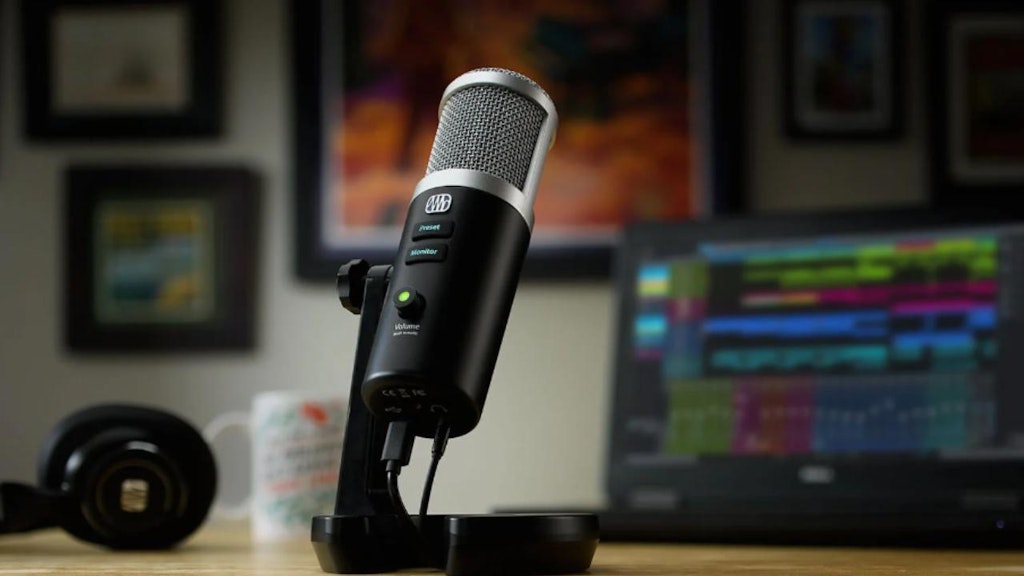
There are several reasons why podcasters prefer the Presonus Revelator. Not only is it a USB microphone packaged with podcast editing software, but it also comes with onboard controls for presets, monitor output, and volume.
The Revelator is one of the first USB microphones to offer State Space-modeled analog processing — it comes with the same compressor, EQ, and Fat Channel gate you can get with podcast mixers. Then, you can store your presets directly on the mic and take them with you wherever you go.
If you’re not planning to pre-record your podcast, you can also use the Revelator to livestream your show. Just keep in mind you’ll need extra accessories (like a mic stand, boom, pop filter, and more).
Read more in our guide to the Presonus Revelator.
RØDE PodMic

The RØDE PodMic is a dynamic podcast mic designed to record the human voice. Each microphone comes with a built-in pop filter, internal shock mount, and swing mount for positioning.
Each RØDE PodMic has a two-year warranty so you don’t need to worry about losing your investment early. It also doesn’t require phantom power, making it an excellent option for traveling or in-the-field recordings.
We discuss this more in our guide to the RØDE PodMic.
Audio Technica AT2040

Many podcasters refer to the AT2040 as a ‘hypercardioid broadcast microphone’ due to its highly directional voice capture design. Like the RØDE PodMic, it has an internal shock mount and pop filter. It also comes with a foam mesh windscreen to better offset unwanted pops and plosives.
The AT2040 thrives in untreated recording environments, which makes it an excellent choice for field recordings. Just keep in mind it’s not as light as other microphones — the extra weight may slow down your podcasting setup.
See how the Audio Technica AT2040 compares in our comprehensive guide.
Samson Q2U

For the ultimate budget alternative for podcasting, the Samson Q2U is the model you need. This mic is half the price of the MV7X while providing a similar level of audio quality.
The Q2U comes with several accessories, including a mic clip, windscreen, tripod stand, and cables. However, you still need to purchase podcast editing software to adjust the sound or use an AI alternative such as Adobe Podcast Enhance.
You can compare and contrast these mics in greater detail with our guide to the Samson Q2U.
Related articles:
The bottom line on the Shure MV7X
The Shure MV7X is the simplest XLR podcast microphone available, easy to set up, minimal controls, and ideal for newer podcasters who want reliable audio without a steep learning curve.
If you’re looking for the simplest podcast microphone, the Shure MV7X may be your best bet. It’s easy to use and straightforward to set up, and with so few bells and whistles, it’s a great option for newer podcasters. For podcasters adding video, pairing it with a quality podcast camera rounds out a complete audio-visual setup.
Are you looking to kick off your podcasting journey? The Podcast Consultant can offer support. We’ve helped hundreds of people (including some of the world’s biggest brands) launch shows, improve their production processes, and put tedious tasks on autopilot.
Learn more about how we can help with your podcast by booking a discovery call today.
Frequently Asked Questions
Does the Shure MV7X need phantom power?
No, the Shure MV7X does not need phantom power. It’s a dynamic microphone, which means it draws the power it needs through a standard XLR connection to your mixer or audio interface. This also makes it a practical choice if you record in different locations.
What is the Shure MV7X, and who is it best for?
The Shure MV7X is a dynamic XLR podcast microphone with a cardioid pickup pattern designed for straightforward voice recording. It’s best for newer podcasters or those who want a reliable, no-frills mic without dealing with complex settings or onboard controls. If you already own a mixer or audio interface, it’s easy to get up and running quickly.
What’s the difference between the Shure MV7X and the MV7?
The biggest differences come down to price, connectivity, and convenience. The MV7 costs roughly $100 more but adds USB connectivity and a touch panel, so you can plug it directly into a computer without a mixer. The MV7X is XLR-only, making it a better fit for multi-guest setups where you’re already running an audio interface.
What do you get in the box with the Shure MV7X?
The Shure MV7X ships with just the microphone and a 3/8-inch Euro thread adapter. Accessories like XLR cables, a boom arm, windscreen, and replacement grills are all sold separately. If you’d rather buy everything at once, a podcast equipment bundle might be a more convenient starting point.
Is the Shure MV7X worth the price compared to cheaper alternatives?
In an MV7X review context, the mic delivers solid audio quality and durability, but it does cost more than several comparable options. The Samson Q2U, for example, offers similar audio performance at roughly half the price and includes more accessories in the box. Whether the MV7X is worth it depends on how much you value the Shure brand reputation and its two-year warranty.
Can you use the Shure MV7X without a mixer?
No, because the MV7X only has an XLR output, it requires a podcast mixer or audio interface to connect to your computer. If you want a mic that plugs directly into a laptop via USB, the Shure MV7 or the Presonus Revelator are worth considering instead.
Is the Shure MV7X compatible with the ShurePlus MOTIV app?
No, the MV7X is not compatible with the ShurePlus MOTIV app. That means you can’t use the app to adjust frequency response, enable Auto Level Mode, or access other software-based controls. For those features, you’d need to step up to the Shure MV7.
What are the best alternatives to the Shure MV7X?
Strong alternatives include the RØDE PodMic, Audio Technica AT2040, Presonus Revelator, and the budget-friendly Samson Q2U. The Revelator stands out if you want onboard controls and built-in processing, while the Q2U is the go-to pick if you want to spend less without sacrificing too much audio quality. Your best choice depends on your budget, recording environment, and whether you need USB or XLR connectivity.